

FAQ
Commonly asked questions related to creating and analyzing funnels in WebEngage
1. How can I track the conversion rate of a funnel?
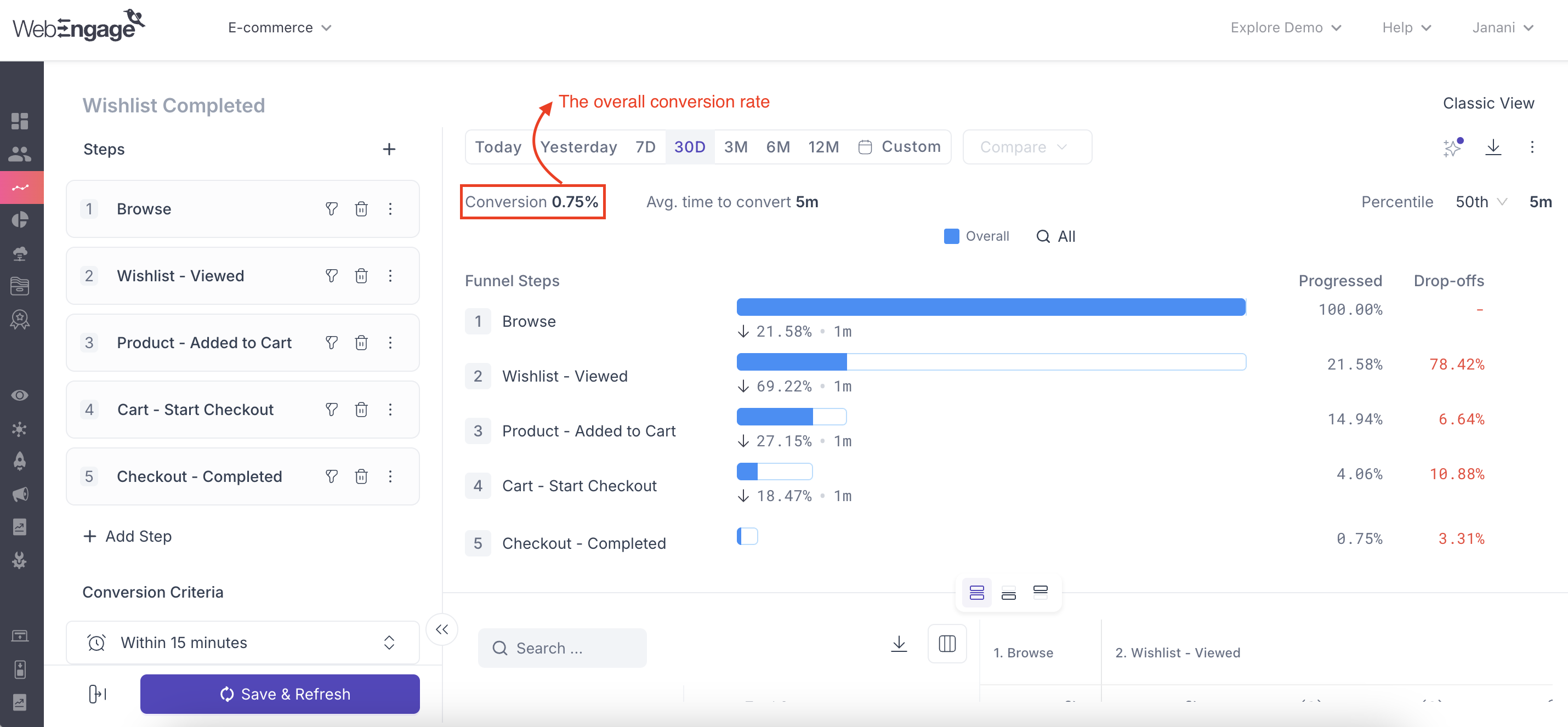
The analysis section of each funnel can be accessed by clicking its hyperlinked title in the *List of Funnels section. You will find the overall conversion rate at the top left of this section, as shown below.
Click to enlarge
2. Is there a cap on the number of funnels I can create on WebEngage?
No, there is no upper limit on the number of funnels one can create in their WebEngage account.
3. Do I need to define each user action as an event to create a funnel?
Yes! You must define each action as an event to track and analyze the behavior of your users and interact with them accordingly.
To make things easier for you, we have mapped out the key events that businesses in the industry of E-commerce, Travel (Hotel Bookings), Travel (Flight Bookings), Gaming Apps, Insurance should track for their respective user lifecycles.
4. Can I create a marketing campaign from the funnel’s page itself?
While the analytics section under each funnel can help you do an in-depth analysis of your user’s behavior, you will not be able to create a corresponding campaign through the same interface. Campaigns can be created through the Journey Designer, targeting users at a particular stage in a funnel.
5. Can I create a funnel to include a specific segment of users?
Currently, it is not possible to create a funnel for analyzing the behavior of a segment of users. Don’t be disheartened. Our tech geniuses are working hard to make this possible for you shortly :)
6. What does Hold Property Constant Across Steps do?
It ensures that the selected event property maintains the same value across every step of the funnel. Each unique property value is evaluated as an independent funnel journey.
7. How many attributes can I keep constant?
You can select up to three attributes.
8. What happens if a selected attribute is missing for an event?
The user exits the funnel at that step because the required property cannot be matched.
9. Can I select multiple attributes?
Yes. When multiple attributes are selected, all selected attributes must match for a user to progress through the funnel.
10. How are repeated property values counted?
Repeated occurrences of the same property value belong to the same funnel journey and do not create additional conversions.
11. Are array-based attributes supported?
No. JSON array attributes are currently not supported.
12. Why am I seeing "No common attribute among events used at this step"?
This message appears when a funnel step contains multiple events that do not share any common attributes available for comparison.
We hope that you have found an answer to all your queries here. Please feel free to reach out via [email protected] in case you have any questions or feedback. We're always just an email away!
Updated 4 months ago